
Postal Life Insurance (PLI) and Rural Postal Life Insurance (RPLI) are among the most trusted insurance schemes in India, offering high bonus rates with low premiums. With digital transformation by India Post, paying your premium online in 2026 has become faster, easier, and more secure than ever before.
This complete guide will walk you through all online methods, step-by-step processes, tips, and important rules to ensure your policy stays active without any hassle.
Why Pay PLI/RPLI Premium Online?
The shift toward digital payments for Postal Life Insurance (PLI) and Rural Postal Life Insurance (RPLI) isn’t just about modern tech—it’s about practical benefits that save you money and protect your financial future.
Here is the key Benefits of Paying Online:
- Avoid Fine and Late Fees: The grace period for PLI/RPLI expires on the last working day of the month. Due to long queues and often link failure and server issue at post offices on the 30th or 31st the deadline is often missed. Making payments online via the portal or the IPPB app ensures that you meet the deadline instantly—even if it is 11:00 PM.
- When you pay at a counter, you must keep of a physical slip. Online payments provide:
. Instant e-Receipts: Downloadable immediately for your records..
. Digital History: A full ledger of all your past payments is available 24/7 on the portal, making it easier to track your investment.
- Set and Forget” with Standing Instructions (SI): Through the IPPB mobile app, you can set up a ‘Standing Instruction.’ This ensures that your premium is automatically deducted on a fixed date every month. This is the best way to guarantee that your policy never lapses—a crucial step for maintaining your high bonus rates (up to ₹76 per ₹1,000 of Sum Assured for certain plans).
- Zero Transaction Costs (UPI): Although processing fees may apply to certain credit cards, making payments via UPI or a debit card on the official PLI portal is generally free of charge. Compared to the time spent traveling to the post office and the cost of fuel, this is the most economical way to manage your policy.
Other UPI like:
- Tax Return Planning Made Easy: At the end of the financial year, you require a premium certificate to claim deductions under Section 80C. Instead of visiting the post office to request the premium statement, you can directly generate and download your annual premium certificate from the online customer portal using your phone in just a few seconds.
- Accessibility for all other Postal life Insurance Scheme: Whether you hold a ‘Suraksha’ (Whole Life) policy or a ‘Sumangal’ (Anticipated Endowment) policy, the digital portal functions identically for both. To make a payment, you do not need to be within your ‘Home’ circle; you can manage your policy from anywhere in the world.
How to Pay PLI/RPLI Premium Online?
There is many different way to Pay online PLI/RPLI Premium Online. As of 2026, here are the three primary ways to pay:
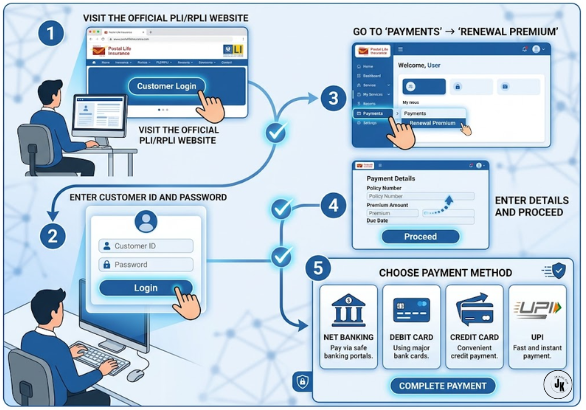
1. Via the PLI Customer Portal (Best for Detailed Records):
- Register Your Self on PLI/RPLI Portal then Generate Your Customer ID
- Login your Customer ID Using Customer ID, Password, then Enter Captcha
- Navigate to Payment TAB then Select “Renewal Premium”.
- Conform your Details: Policy Number, Amount, Verify Thoroughly then Click on “Conform & Pay”.
e. Choose Your Payment Option: Net Banking, Debit Card, Credit Card, or UPI.
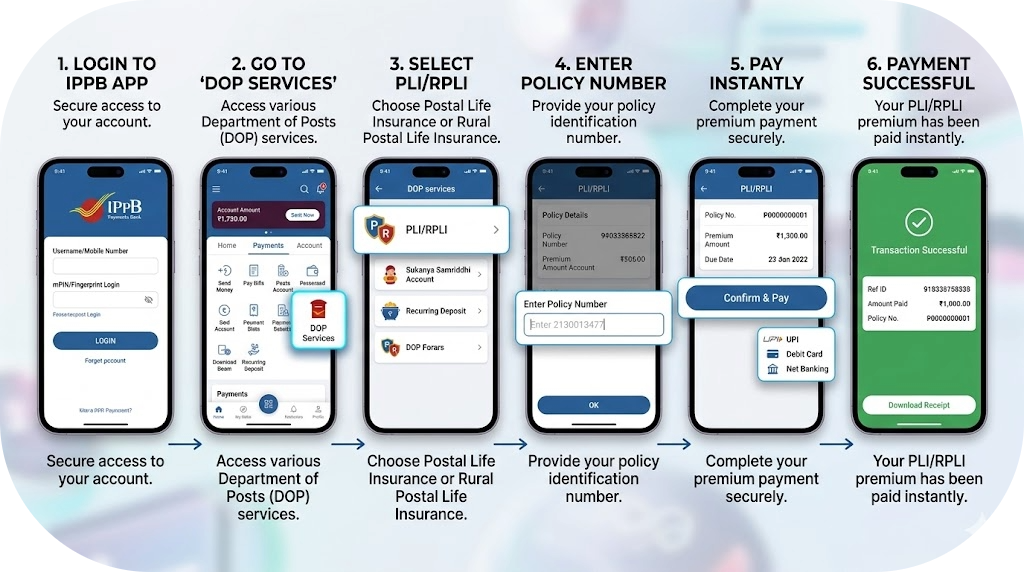
2. Via the IPPB Mobile App (Easiest for Mobile Users)
- Log in to your IPPB Mobile Banking App using Your MPIN
- Go to My service from Home Screen
- Tab on Post Office Services
- Select Postal Life Insurance
- Select Pay Premium
- Enter Your Policy Number and Date Of Birth
- Tab on Continue and conform the Payment Using IPPB Balance.
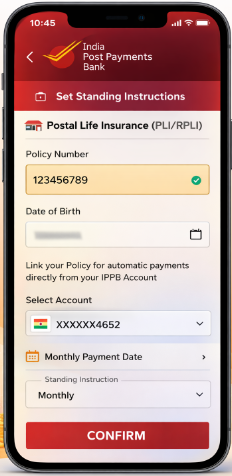
- You Can also Make Standing Instruction (SI) By selecting SI option Given Below in your Mobile APP.
SET STANDING INSTRUCTION THROUGH MOBILE
3. Via DoP Internet Banking (For Post Office Savings Account Holders)
- Log in to your DOP eBanking Account
- Go to General Service Tab
- Select “Service Request” then Click on “Pay PLI Renewal Premium”
Conclusion:
The introduction of online payment facilities by the Department of Posts—and the adoption of these digital methods for your PLI or RPLI policies—is far more than just a digital convenience; it represents a mindset shift toward financial discipline and long-term peace of mind. By utilizing platforms such as the official Customer Portal or the IPPB app, you eliminate the hassles associated with payment errors, long queues, and missed deadlines—systemic issues that can otherwise lead to hefty penalties or, unfortunately, the lapse of your coverage. In today’s world, where financial security is paramount, the ability to automate your premium payments via ‘Standing Instructions’ or to make instant payments via UPI ensures that your hard-earned bonuses continue to accrue without interruption.
Furthermore, the ease of digital deposits and the immediate receipt of premium certificates simplify your tax planning under Section 80C, transforming your insurance management into a streamlined, paperless system. All in all, this transition toward digital payments grants you complete control over your life insurance portfolio, ensuring that the protective umbrella safeguarding your family remains robust, active, and easily manageable from anywhere in the world. This modernization embodies the efficiency and reliability essential for securing your future within today’s financial landscape.